Sunday, September 28, 2014

Corsair Unleashes Corsair Gaming RGB Keyboards, RGB Mice, and Headsets

Corsair, a leader in PC hardware, today launched Corsair Gaming, a new division within the company dedicated to the elevation of PC gaming and the development of high-performance PC peripherals. Forged from Corsair's engineering know-how and developed alongside eSports professionals and gaming enthusiasts, Corsair Gaming products are driven by a philosophy of performance, style, and comfort. Corsair Gaming's first salvo is the immediate worldwide release of the much-anticipated range of RGB keyboards and mice.

"For 20 years, Corsair has equipped gamers with high-performance, precision hardware to build their dream PCs. Corsair Gaming now introduces new ways for PC gamers to optimize how they play," said Andy Paul, Corsair President and CEO. "We've brought together our engineering expertise and our passion for gaming to build a line of products that delivers performance, customized for however you play."

K95 RGB, K70 RGB, and K65 Gaming Keyboards
With their color-customizable, 16.8 million color backlighting, the K95 RGB, K70 RGB, and K65 RGB are the headliners of the Corsair Gaming brand. All three keyboards use only German-made Cherry MX RGB mechanical key switches as part of an exclusive-to-launch partnership with Cherry.

Each key switch is built with the exacting precision of Cherry's self-cleaning, corrosion-proof Gold-Crosspoint electrical contacts, and with over five billion sold, Cherry MX mechanical key switches are the premier choice of professional gamers and enthusiasts who demand uncompromising reliability and performance. Combined with Corsair Gaming's distinctive aircraft-grade aluminum baseplate, Cherry MX RGB key switches deliver a professional-level gaming keyboard that ensures both consistency and accuracy with the touch of every key.

The K95, K70, and K65 RGB keyboards exhibit Corsair's hallmark features: sleek design, ultra-precision components, and sturdy aircraft-grade aluminum construction that guarantee long-lasting performance.

Powerful Corsair Utility Engine (CUE) software enables the creation of unlimited lighting effects and macros, from solid colors that can highlight key groupings, to smooth gradients, dramatic waves and captivating ripple patterns. These customization options let gamers match their PC system lighting, find gaming keys faster, and provide critical visual feedback for executing in-game objectives.

Corsair Gaming understands that gamers demand choice when it comes to their hardware, so the K95, K70, and K65 RGBs cater to your every need - including size. All three support complete macro programmability on any key, with the K95 RGB offering an additional array of 18 dedicated macro keys and dedicated media-keys. In contrast, the compact 10-keyless K65 RGB removes the number pad and media keys for a desk-space-saving design, while the K70 RGB offers the standard keyboard layout and media keys that have already made its predecessor the choice for serious gamers.
  • 100% German-made Cherry MX RGB mechanical Red, Blue, or Brown key switches (K65 RGB available with Red key switches)
  • 16.8 million multicolor per-key backlighting for virtually unlimited customization
  • Corsair Utility Engine (CUE) enables users to create and customize their own lighting patterns, animations, and macros
  • Aircraft-grade black anodized brushed aluminum for superior rigidity
  • 100% anti-ghosting with full key rollover on USB
  • Onboard memory stores performance and lighting settings
  • Two-year warranty
  • K95 RGB: $189.99 MSRP
  • K70 RGB: $169.99 MSRP
  • K65 RGB: $149.99 MSRP (available exclusively from Best Buy in the US, and other retailers worldwide)
M65 RGB Gaming Mouse
The M65 RGB gaming mouse - available in black or white - continues Corsair Gaming's focus on RGB color customization. This high-end gaming mouse goes beyond the industry standard with built-in three-zone 16.8 million color backlighting. Housed on a durable aluminum unibody chassis, the 8,200 DPI, gaming-grade laser sensor helps gamers make their mark, with a sniper button ensuring the most critical of shots stays on target. Charging the battlefield with a rubber-grip metal high-mass scroll wheel, eight programmable buttons, and adjustable weight turning zones, the M65 RGB mouse balances precise control and intelligent tracking with innate comfort and style.
  • Three-zone backlighting with up to 16.8 million colors for virtually infinite customization
  • Custom-tuned 8,200 DPI gaming-grade laser sensor for pixel-precise tracking
  • High-capacity Omron switches rated for 20 million clicks for years of precise triggering
  • Aircraft-grade aluminum baseplate for light weight and durability
  • Adjustable weight system helps set the center of gravity to match play style
  • Eight strategically placed buttons, including a dedicated sniper button with improved positioning
  • On-the-fly DPI switching to instantly match mouse speed to gameplay demands
  • Two-year warranty
  • $69.99 MSRP
H2100 and H1500 Headsets
The Corsair Gaming H1500 and H2100 Headsets are part of Corsair's new line of high-performance gaming equipment. Joining the K95, K70, and K65 RRB Keyboards and M65 RGB Mice, the H1500 and H2100 Headsets fully immerse gamers - and their ears - in battle. In both wired and wireless options, the Corsair Gaming Headsets offer Dolby 7.1 surround sound for accurate positional audio that captures the acoustic environment of every moment of gameplay. The H1500 keeps gameplay closer to the system, while the H2100 enables gamers to play for over ten hours with up to 40 feet of unrestricted movement, combining epic audio and optimum comfort without the hassle of wires.
  • Genuine Dolby 7.1 surround sound for complete immersion
  • Micro-fiber wrapped memory foam earpads for comfortable gaming sessions
  • Advanced unidirectional noise-cancelling microphone
  • Oversized 50mm neodymium drivers for crystal clear audio
  • H2100 headset offers wireless freedom up to 40 feet and over 10 hours per charge
  • Two-year warranty
  • $79.99-$99.99

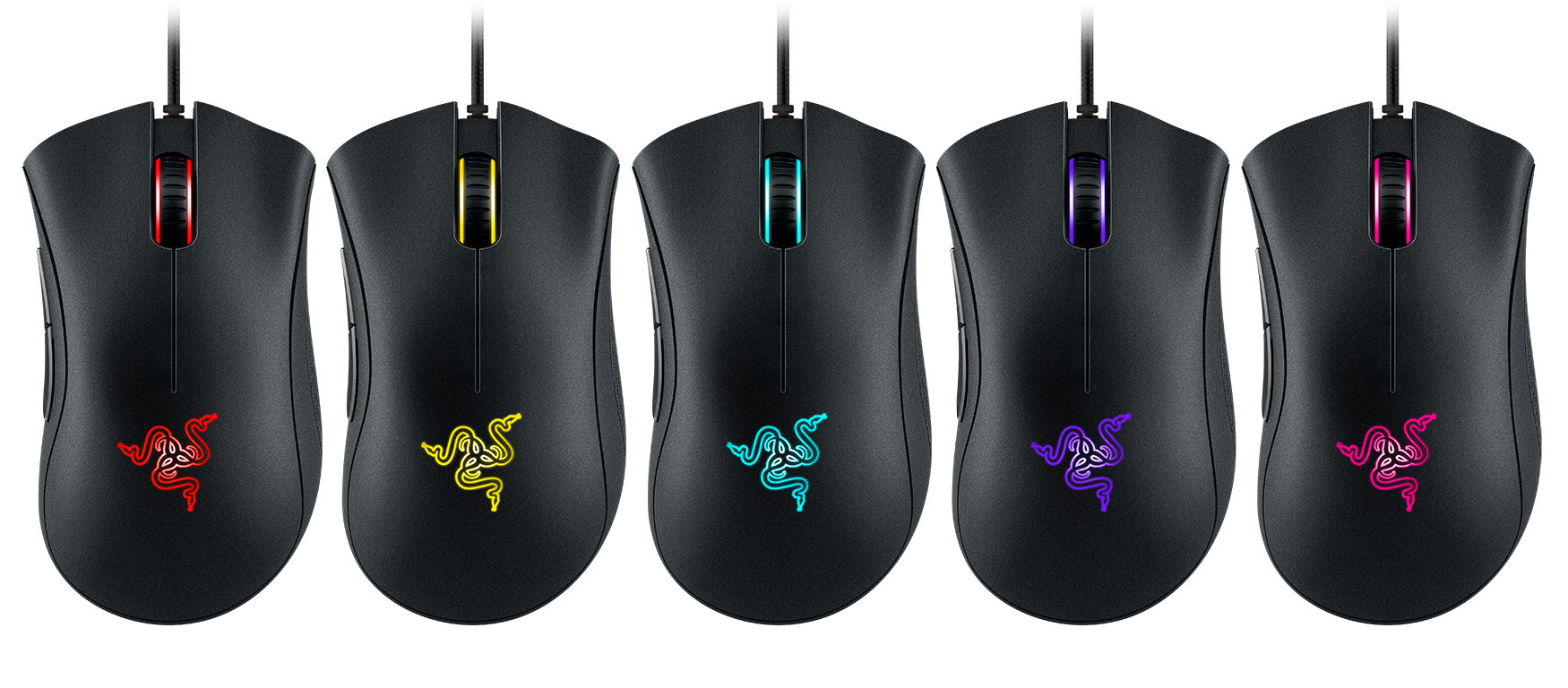
Razer DeathAdder Chroma Gaming Mouse Launched

Razer, a world leader in connected devices and software for gamers, today announced the launch of the Razer DeathAdder Chroma gaming mouse. The Razer DeathAdder Chroma features the renowned ergonomic design of its precursor. It is equipped with a 10,000 DPI optical sensor that is able to track lift-off distance as precise as 1 mm on most surfaces, including glass table tops. The upgraded sensor is capable of mouse movement speeds up to 200 inches per second with 50 G acceleration, ensuring exacting accuracy and organic fluidity onscreen.

Together with Razer Synapse: Stats & Heatmaps, the Razer DeathAdder Chroma provides gamers precise details such as game time, button presses, distance moved and even how much overall pressure was exerted while gaming. This incredible amount of technical tracking data coupled with the upgraded ultra accurate sensor allows gamers to tweak the Razer DeathAdder Chroma to their individual play style and further increase their accuracy more than with any other mouse on the planet.

"The Razer DeathAdder Chroma is the world's best gaming mouse favored by eSports athletes everywhere," says Min-Liang Tan, Razer co-founder and CEO. "Our Synapse software continues to add value to our hardware products, and this is the latest example of that. Validated by professional eSports athletes, the iconic ergonomic design and the ability for gamers to hone their accuracy make the Razer DeathAdder Chroma the perfect mouse for any play style."

The DeathAdder Chroma joins the BlackWidow Chroma and Kraken 7.1 Chroma that come with the option of 16.8 million customizable colors and a range of effects through Razer's cloud-based hardware configurator Razer Synapse. Chroma allows the device to sync lighting colors and patterns and comes with an open SDK that enables game developers to integrate advanced lighting effects based on in-game events such as a base being under attack and much more.

Product features
  • Ergonomic right-handed design with textured rubber side grips
  • 10,000 DPI optical sensor
  • Chroma lighting with 16.8 million customizable color options
  • Razer Synapse enabled
  • 5 Independently programmable Hyperesponse buttons
  • 1000 Hz Ultrapolling
  • On-the-fly sensitivity adjustment
  • Always-on mode
  • 200 inches per second / 50 G acceleration
  • Gold-plated USB connector
  • 2.13 m / 7 ft., lightweight, braided fiber cable
  • Approximate size: 127 mm / 5 in. (Length) x 70 mm / 2.76 in. (Width) x 44 mm / 1.73 in. (Height)
  • Approximate weight: 105 g / 0.23 lbs.
PRICE: USA: $69.99/EUR: €69.99

Windows 9 changes and new features: Everything we know so far


Microsoft is all set to officially unveil Windows 9 at a special event on September 30 — and so we thought it would be a good time to run through everything that we already know about Microsoft’s new operating system. Most of these features and changes are reliably sourced from people close to the development of Windows 9 or from leaked builds of the Windows 9 Technical Preview. We’ll also update this story with an official list of Windows 9 features when Microsoft starts releasing public beta builds next week. In short, if you want to find out about Windows 9, this is the place to be.

After the very poor response to Windows 8, and the bitter taste it left in the mouths of millions of users, Windows 9 is a very important release for Microsoft. On the one hand, it needs to rectify Windows 8′s wrongs and offer normal PC users a reason to upgrade from Windows XP or 7. On the other hand, Microsoft continues to lose ground in the mobile sector as well. Windows 9 will actually have to be the jack of all trades, rather than Windows 8′s rather ignominious status as the master of none. How will Microsoft do this? Well, let’s take a look.

Windows 9 for desktop and laptop users


The Start menu returns. After a few years of claiming that the Metro-style Start screen was just as good for mouse-and-keyboard use as touchscreen use, Microsoft has finally backed down. Windows 9 will have a Start menu on the Desktop; the left side will look a lot like the standard Windows 7 Start menu, but the right side will have the option of being populated with Metro-style live tiles. The left side of the menu will adopt a new Metro-like look, too — though you may be able to configure it to look like the good ol’ Windows 7 Start menu.

Virtual desktops. In Windows 9, you will have the option of using virtual desktops. Right now you just have one desktop per monitor — but with virtual desktops, you can switch between as many desktops as you like. This is a popular power user feature that has been present on some Linux window managers and via third-party Windows tools for years — but now it’ll be native in Windows 9.
Metro apps on the Desktop. Rather than forcing you into the full-screen Metro interface, Windows 9 will let you run Metro apps on the Desktop in a window. In theory this will mean that mouse-and-keyboard users might now actually use Metro apps, which in turn might kickstart the arrival of some better apps in the Windows Store. Or not.
Windows 9 Desktop, showing a new, very flat Explorer (note the new icon too)

Desktop interface overhaul. It’s not entirely clear yet, but it seems the Windows 9 Desktop will receive a graphical overhaul, to make it even flatter. The leaked Windows 9 Technical Preview shows some flatter icons and thinner window borders — and I suspect we’ll see some further UI changes in later preview builds. (If you recall, the first Windows 8 Developer Preview still looked a lot like Windows 7, and became more flat and less opaque as the development process went on.) Curiously, there does appear to be a drop shadow behind the Explorer window in the Windows 9 screenshot above — Windows 8 got rid of a lot of shadows, so it would be interesting if they made a return.

The Metro interface may be removed. In the last few months, there has been rumblings from Redmond that the Windows 9 experience might be formally split in two: A Metro-only experience for touchscreen/tablet users, and a Desktop-only experience for mouse-and-keyboard users. One of the biggest complaints of Windows 8 is the way it forces you into the Metro interface when you’re using a mouse and keyboard, and the Desktop interface when you’re using a touchscreen. It isn’t clear if the Metro interface will be removed entirely from “Windows 9 for the Desktop” — more realistically, to cater for users of hybrids and touchscreen laptops, there’ll just be a check box somewhere for “never show me the Metro interface.”
Lots of other tweaks to the Windows 9 Desktop. In addition to all of the above, the Charms bar is also being removed (from the Desktop interface at least; it might hang around on touchscreen devices). The Technical Preview has a Notifications panel that pops up from the bottom right corner (video above), though I don’t think this is its final format or placement. There will also likely be tweaks for multi-monitor and high-res (hi-dpi) setups, too.


Windows 9 for touchscreen tablet/hybrid users


So far, we know relatively little about the Windows 9 experience for tablet, touchscreen, and hybrid users. It is likely that the Desktop will be removed (or at least made very hard to access) so that touchscreen users only have to interact with the Metro interface. It would make sense if Microsoft made it so tablet/touchscreen users never had to venture out to the Desktop to access the Registry Editor or Control Panel (both of which are hard to use without a mouse and keyboard).

Here are some other possible tweaks to the Metro side of things:

The Cortana digital assistant is making the jump from Windows Phone. Cortana, Microsoft’s answer to Siri, will reportedly be coming to Windows 9. She will probably be accessible from both the Desktop and Metro, but presumably her ability to understand natural language will be more useful for people on the move, or without a keyboard. If Cortana is capable of understanding (and executing) complex filters, she could be a very useful addition to Windows 9. (Imagine being able to say “Cortana, show me all of my photos from my 2011 trip to Mexico.”)

Start screen tweaks. While the Start screen will still look much the same in Windows 9, many of its elements will be tweaked. Live tiles — the big, resizable icons that show updates and notifications — will be reportedly be upgraded, so that you can actually use some features of an app from the tile, without having to open it up. Live folders from Windows Phone 8.1 Update 1 may also make the jump to Windows 9.


Notifications. While the leaked Technical Preview has a Notifications tray on the Desktop, I suspect the final version of Windows 9 will have some kind of Notifications panel in the Metro interface as well — probably resembling the Notifications panel from Windows Phone 8.
One Windows: Windows for all, Windows Phone, etc.

Windows 9: Other general updates, tweaks, and rumors


In addition to forward-facing UI changes to the Desktop and Metro, Windows 9 will of course have lots of under-the-hood changes. The most notable so far seems to be one-click upgrading: With Windows 9, upgrading to the next version (Windows 9.1, Windows 10) should be a simple matter of clicking one button.

Will Windows 9 be the last major version of Windows? Coincidentally, the change to a one-click upgrade cycle also suggests that Windows 9 will be the last major version of Windows (at least for a while). Microsoft has been trying to shift its sizable bulk towards a faster release cycle over the past couple of years, so that Windows and Windows Phone can evolve more rapidly — just like iOS, Android, and OS X. One-click upgrades would be a sure sign that Windows 9 is moving away from major overhauls and towards smaller, iterative updates like OS X.
Windows 9 wallpaper mockup
A possible (but unlikely) Windows 9 logo

What will Windows 9 be called? There has been some discussion about whether Windows 9 (codenamed Threshold) will actually be called Windows 9, or whether Microsoft will instead call it just Windows or maybe Windows One. Just yesterday, however, the head of Microsoft’s France operations said that the company would be releasing “Windows 9″ at the September 30 event in San Francisco. Microsoft’s PR team quickly backpedaled, saying the next version of Windows “at this stage does not have a name as such.” Hmm.

Universal Windows apps. In theory, we should begin to see the arrival of truly universal Windows/Windows Phone apps on Windows 9. It still isn’t entirely clear what Microsoft’s vision for universal apps is, but I suspect we’ll hear more about it at the September 30 event. The idea of buying a single app and running it across all of your Microsoft devices (including the Xbox One) is rather sweet, but I think it depends on…
Microsoft Windows 9 event, September 30

… the merger of Windows Phone and Windows RT. So far, despite the leak of the Windows 9 Technical Preview a few weeks ago, we know very little about the Metro interface. One possibility is that the Windows 9 Technical Preview is actually just for mouse and keyboard users, and that Microsoft is working on another preview build for mobile devices. This ties in neatly with a rumor that Microsoft is currently working on merging Windows Phone with Windows RT.
We’re sure there will also be lots of other underlying improvements to Windows 9 — little tweaks, support for new kinds of hardware, improved high-DPI support — but we won’t discover them until we actually get our hands on the Windows 9 Technical Preview. Stay tuned: The September 30 unveil of Windows 9 is now just a few days away.


Sunday, September 21, 2014

Samsung Unveils the S27D590C 27-inch Curved Monitor

Samsung Electronics introduced the 27-inch S27D590C Full HD Curved Monitor designed to enhance visually compelling entertainment content. The advanced display creates a more immersive viewing experience through its curved design and innovative features.

"Our new, 27-inch curved monitor takes movie watching and gaming to new heights from the monitor's unique curved screen and comprehensive entertainment features, to the incredible picture quality and the impressive sleek design," said Seoggi Kim, Senior Vice President of Visual Display Business at Samsung Electronics. "The S27D590C embodies our singular focus to create a truly unforgettable entertainment experience."

Ultimate Viewing Experience
The curvature of the S27D590C improves the viewing experience in comparison to traditional flat screen monitors as the screen boasts nearly uniform viewing distances from the center of the screen to its edges. This curvature matches the natural curve of the human eye and makes it easy for the viewer to completely immerse themselves in games and movies.

Additionally, the screen's curvature creates a wider field of view and greater sense of depth, which enables viewers to enjoy a panoramic view and gives the screen a 3D-like effect. The 3D effect is particularly apparent when enjoying first-person perspective games, such as racing and flight simulators, avatar-based adventures and shooters.

With an ultra-wide viewing angle of 178 degrees both horizontally and vertically, the curved monitor's vertical alignment (VA) panel optimizes the viewing experience from any position and minimizes picture distortion. In addition, the S27D590C's Mega Dynamic Contrast Ratio technology delivers a high contrast ratio of 3000:1 and 350 cd/m2 brightness help produce life-like images with deeper blacks, pristine whites and brighter colors.

Optimized for Entertainment
The integration of enhanced entertainment features takes gaming and multimedia content experience to the next level. The monitor comes fully equipped with built-in 5-watt dual speakers that deliver high-quality stereo sound as well as a game mode function that can be quickly activated with a simple touch of a button. The game mode intelligently detects on-screen changes and corrects blurry images, enhances colors and alters contrast for improved visibility of in-game action.
 
The monitor has a clean and minimalist look, ensuring viewers enjoy the enhanced viewing experience of the curved screen without any distraction. Its sophisticated design makes pictures seemingly float in mid-air, captivating the viewer instantly. Users can also easily adjust the screen angle using the tilt screen function to minimize glare and reflection. The monitor also supports 100×100 mm VESA standard brackets for stress-free wall or table mounting.

Saturday, September 20, 2014

Intel Z97 Motherboard Roundup: Asus, Asrock, EVGA, MSI & Gigabyte

When Haswell replaced Ivy Bridge last year it came accompanied by Intel's 8-series chipset. Codenamed 'Lynx Point', the Z87 flagshipoffered broader SATA 6Gb/s support, more USB 3.0 ports, and did so while consuming almost 40% less power.

It had been expected that the Z87 chipset would see the Haswell range out, but this June delivered a Haswell refresh and along with some rebadged CPUs we got the new 9-series chipset and a successor to the Z87. Codenamed 'Wildcat Point', the new Z97 was virtually identical to its predecessor with a few exceptions.

The most noteworthy change was support for future Broadwell CPUs, which should arrive during the coming holiday shopping period. In addition to compatibility with future processors, the Z97 brought SATA Express as well as the M.2 socket (briefly known as NGFF or the next generation form factor after mSATA).

M.2 is a specification for internally mounted storage and add-in cards. First designed for mobile devices, the M.2 interface has found its way into desktops and the new Z97 and H97 chipsets have played a big role in speeding up its adoption as a replacement for mSATA, which uses the PCI Express Mini Card physical layout.
Having a smaller and more flexible specification together with more advanced features, the M.2 is better suited for solid-state storage applications in general, especially when used in small devices like ultrabooks or tablets.

SATA Express is less promising in our opinion as it doesn't currently have supporting SSD devices. Whereas the M.2 socket is typically shared with one SATA 6Gb/s port, the SATA Express interface takes two SATA 6Gb/s ports and requires a third smaller port which deals with PCI-Express based communications.

With over 90 motherboards available right now using the Z97 chipset, picking the right one can be a difficult decision. Hoping to narrow the search down, we have taken seven popular boards and compared them in just about every way possible.

We've included a total of seven boards from Asus, Asrock, EVGA Gigabyte and MSI in this roundup. Check out the comparisson table below for a quick glance at the features offered by each or skip to the respective page for a more detailed rundown.

Asus Z97-
Deluxe
MSI Z97
Mpower Max AC
Asrock Z97 Extreme9Asus Z97-Pro WiFi/ACGigabyte Z97X-UD5H-BKEVGA Z97
FTW
Asrock Z97 Extreme6
Price$275$250$240$210$200$170$165
Dual PCIe x16x8 / x8x8 / x8x16 / x16x8 / x8x16 / x8x8 / x8x8 / x8
Triple PCIe x16x16 / x8 / x4x8 / x4 / x4x8 / x8 / x16x16 / x8 / x4x16 / x8 / x4x8 / x4 / x4x8 / x8 / x2
Quad PCIe x16No SupportNo Supportx8 / x8 / x8 / x8No SupportNo Supportx8 / x4 / x4 / x1No Support
mini-PCI Express SlotNo SupportNo Supportx1No SupportNo SupportNo Supportx1
SATA 6Gb/sx6x8x10x6x8x8x10
SATA Expressx2No Supportx2x1x1No Supportx1
M.21 x M.2 (NGFF)1 x M.2 (NGFF)1 x M.2 (NGFF)
1 x Ultra M.2 Gen3 x4
1 x M.2 (NGFF)1 x M.2 (NGFF)No Support1 x M.2 (NGFF)
1 x Ultra M.2 Gen3 x4
M.2 Supported Length60 and 80mm42, 60 and 80mm30, 42, 60, 80 and 110 mm60 and 80mm42, 60 and 80mmNo Support30, 42, 60, 80 and 110 mm
eSATANo SupportNo Supportx1No SupportNo SupportNo Supportx1
Storage Interfaces9915810814
Maximum Usable781278812
AudioRealtek ALC1150Realtek ALC1150Realtek ALC1150Realtek ALC1150Realtek ALC1150Realtek ALC898Realtek ALC1150
NetworkDual Gigabit LAN
Intel I218V & Intel I211AT
Single Gigabit LAN
Intel I218V
Dual Gigabit LAN
Intel I218V & Intel I211AT
Single Gigabit LAN
Intel I218V
Dual Gigabit LAN
Intel I217V & Killer E2201
Single Gigabit LAN
Intel I217
Dual Gigabit LAN
Intel I218V & Realtek RTL8111GR
WiFiWi-Fi 802.11ac + Bluetooth 4.0Wi-Fi 802.11ac + Bluetooth 4.0No SupportWi-Fi 802.11ac + Bluetooth 4.0No SupportNo SupportNo Support
USB 3.0x10 (6 rear/4 onboard)x12 (8 rear/4 onboard)x8 (4 rear/4 onboard)x8 (4 rear/4 onboard)x8 (6 rear/2 onboard)x6 (4 rear/2 onboard)x10 (6 rear/4 onboard)
ThunderBoltNo SupportNo SupportNo SupportNo SupportNo SupportNo SupportNo Support
Display OutputsDisplayPort, Mini DisplayPort, HDMIHDMI, DisplayPortHDMI, DisplayPortHDMI, DisplayPort, VGA, HDMIHDMI, VGA, DVIHDMI, DisplayPortHDMI, DisplayPort, DVI
Form FactorATX 305 x 244mmATX 305 x 244mmATX 305 x 244mmATX 305 x 244mmATX 305 x 244mmATX 305 x 244mmATX 305 x 244mm

NVIDIA GeForce GTX 980 Review


NVIDIA is doing the scientific community a great service by code-naming its GPU architectures after pioneering physicists. "Kepler" became synonymous with the GeForce GTX 680 launch back in 2012; and although it got its debut with the mid-range GeForce GTX 750 Ti earlier this year, "Maxwell", NVIDIA's latest GPU architecture, is really beginning to unravel with the new GeForce GTX 980 and GTX 970 we are reviewing today.

The development cycle of GPUs isn't too different from that of CPUs. A new GPU architecture is introduced every two or so years, facilitated by a new silicon fab process, which allows designers to cram in more transistors, to up performance. The common foundry partner for both NVIDIA and AMD, TSMC, threw a spanner into the workings of this cycle when news broke of delays in the implementation of its 20 nanometer manufacturing node, successor to the 28 nm node on which NVIDIA's GeForce Kepler and AMD's "Volcanic Islands" families of GPUs were built. NVIDIA probably had to redesign the performance-segment GPU based on its swanky new "Maxwell" GPU architecture for the existing 28 nm node. Its fruition is the GM204, the 5.2 billion transistor chip at the heart of the GeForce GTX 980 and GTX 970.

With the introduction of the GeForce GTX 980 and GTX 970, NVIDIA's product stack looks very similar to the way it did in 2012, in which the performance-segment GK104 went into making the GTX 680 and GTX 670, positioned as high-end parts because of their relatively higher performance to AMD's high-end chips at the time. Much like "Kepler" and GK104, "Maxwell" and GM204 boast leaps in performance-per-watt and overall performance. However, those two facets aren't Maxwell's only propositions. NVIDIA announced a bucket-list of innovations in consumer-graphics technologies, such as support for Microsoft's next-generation DirectX 12 API, Dynamic Super Resolution, Multi-Frame Sampled AA, Voxel Global Illumination, and VR Direct. Such is NVIDIA's confidence in the superiority of its "Maxwell" architecture, that it thinks a 28 nm chip with 165W TDP can outperform "Kepler" based chips on the same 28 nm process with a 50 percent higher TDP.
 
The GeForce GTX 980, hence, is NVIDIA's newest high-end single-GPU graphics card, by possible virtue of its performance. It is priced at US $549, which is $100 cheaper than the GeForce GTX 780 at launch, but $50 more than the GTX 680 at its launch. The GeForce GTX 970, on the other hand, is a high-performance offering priced at $329. With the introduction of these two, NVIDIA announced the discontinuation of the GeForce GTX 780 and GTX 770 from the product stack. The GTX 760 even sees a price-cut that puts it at $219. NVIDIA priced the GTX 980 to lock horns with AMD's R9 290X, and the GTX 970 is slotted to compete against the R9 290. Will they succeed?